Better resource management with compute quotas and usage dashboards
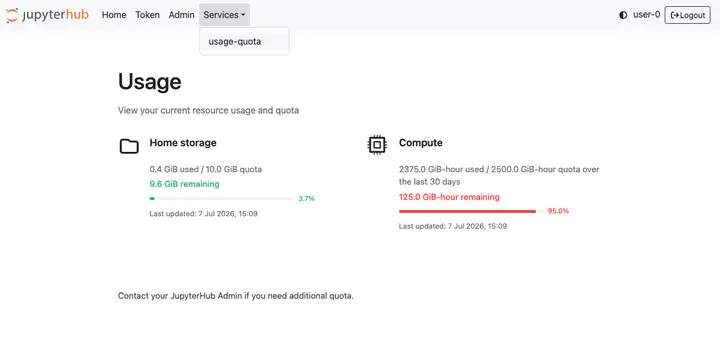
Compute quotas and usage dashboards are now available on 2i2c hubs 🚀
This allows hub admins to cap the amount of compute resource a user can access over a given time period, as well as providing end-users with updates on their current usage.
Compute quotas #
Suppose you are running a workshop and would like to cap usage to a 4GiB RAM server for each user per day. Then with compute quotas you can apply a usage cap of 4GiB x 24 hours = 96 GiB-hours over a rolling 1 day window individually to every member of a particular JupyterHub group. Alternatively, can also apply a blanket compute usage policy to all users irrespective of JupyterHub group memberships. For more details, see the documentation. If you would like to apply a compute usage policy for your hub, then please get in touch with our support desk.
Usage dashboards #
To accompany this new feature, we have rolled out a user-facing dashboard to keep track of usage. The home storage component is enabled by default, which shows the used versus available disk usage in a user’s home directory. The compute component is enabled if a compute quota policy is applied to the hub.
Learn more #
- 2i2c Community Hub Guide documentation
jupyterhub-usage-quotasdocumentationjupyterhub-usage-quotasGitHub repository
Acknowledgements #
- @sarahw-earthscope and team at the Earthscope Consortium for co-creating and funding this project
- @sunu (Development Seed) for co-developing the
jupyterhub-usage-quotaspackage - @hanbyul-here and @wildintellect (Development Seed) for early design feedback
- @minrk (BIDS) for making upstream improvements to JupyterHub for this feature
- Funding support for this work also came from (NASA VEDA), a project of the Data Systems Evolution team at NASA Marshall Space Flight Center’s Office of Data Science and Informatics (ODSI). ODSI enables scientific exploration and discovery through innovative data visualization techniques and analysis capabilities that lower the barrier to entry for cloud-hosted data.
Thanks for reading! If you'd like to follow our work, join our mailing list or subscribe to our blog. You can read our community hub documentation or learn about membership.