Fixing out-of-memory behaviour in recent Kubernetes deployments
In Q1, 2i2c finished upgrading our community clusters to Kubernetes 1.34.
In order to continue providing the latest features and security fixes, we are keen to ensure that our communities are using up to date versions of key components like Kubernetes, JupyterHub, and the various Helm charts that we deploy.
This recent round of upgrades marks the start of a new process to ensure that we roll these updates out on a regular cadence, as described in our recent blog post.
After completing these upgrades, we received a report from the CryoCloud community concerning “unusual” behaviour of their hub:
It regularly occurs when I blow out my memory. […] Usually when I run out of memory though, the kernel just restarts.
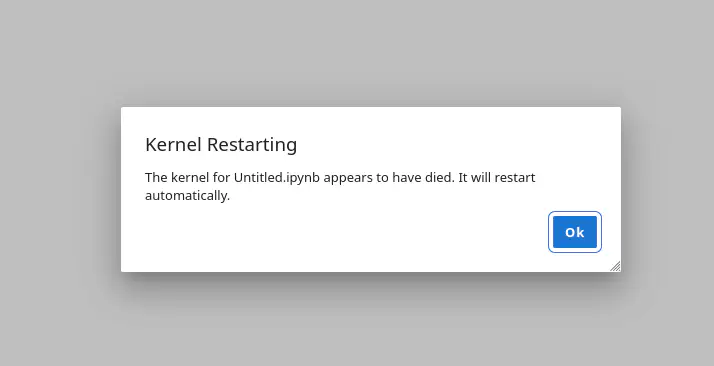
This is a fantastic message to receive as an infrastructure engineer; it details both the expected behaviour, and what the user saw instead! Forewarned with the notion that this was related to out-of-memory events, 2i2c Engineers wrote a tiny script to trigger an out-of-memory event from a notebook kernel process, and observed the infrastructure. Like this user, we expected the Linux kernel to terminate the greedy process which usually appears with the following message
What we observed was the kernel killing every process in the user pod, a much more disruptive experience! Knowing that we had recently upgraded the EKS version on this cluster from 1.32 to 1.34, we suspected that a change to the out-of-memory behaviour had been introduced with a newer version of Kubernetes. An initial comparison of the changelogs for Kubernetes 1.32 through 1.34 did not yield any obvious suspects. Kubernetes itself did not significantly alter process memory handling in any version between 1.32 and 1.34. So, we took a closer look at the changes introduced by our upgrade.
During the move from 1.32 to 1.34, we upgraded from AL2 to AL2023 AMIs.
The Amazon Machine Image governs the configuration of the host virtual machine that underpins each AWS EC2 instance.
Buried in the documentation about the differences between AL2 and AL2023 AMIs is a note detailing the switch of the cgroups mechanism for organizing processes and distributing system resources from version 1 to version 2.
Out-of-memory scenarios are handled differently by cgroups v1 and cgroups v2.
In v2, there is a new memory.oom.group flag that turns on cgroup-wide process killing when any single process within that cgroup consumes too much memory.
In Kubernetes 1.28 and newer, this flag defaults to 1 (on).
Our conclusion was that the upgrade from EKS 1.32 to EKS 1.34 inadvertently introduced a regression in the behaviour of out-of-memory scenarios through the application of an “old” cgroups policy that became active in AL2023.
A singleProcessOOMKill kubelet configuration flag was added in Kubernetes 1.32 that restores the previous cgroups v1 behavior.
We now set this flag in our kubelet configurations to ensure that OOM kill behaviour follows our users’ expectations.
We are rolling this fix out across our network gradually to avoid disruption.
Note: This has since been fixed in a new version of AL2023 docs.aws.amazon.com/linux/al2023/ug/ecs.html#ecs-al2-changes
Learn more #
Acknowledgements #
- Thanks to the CryoCloud community for surfacing this regression so articulately!
Thanks for reading! If you'd like to follow our work, join our mailing list or subscribe to our blog. You can read our community hub documentation or learn about membership.