Better sharing UX with nbgitpuller and contextual error handling
TL;DR #
nbgitpuller now has improved UX context-aware error handling. Update to version 1.3.0 and let us know what you think by opening an issue or via the feedback form below 🚀
What is nbgitpuller? #
nbgitpuller is a way to sync content with compute through the click of a link. Example use cases include:
- Interactive research demos, such as Spyglass (HHMI)
- Workshops and training scenarios
- University exams
In the case of Spyglass, the content is LorenFrankLab/spyglass-demo hosted on GitHub, the compute is a 2i2c cloud hub hosted at spyglass.hhmi.2i2c.cloud, and by using the handy nbgitpuller link generator, you can generate this nbgitpuller link to share with others to seamlessly explore content on the desired compute platform with the relevant data and toolchains installed.
How does nbgitpuller work? #
nbgitpuller is installed in the compute environment. The compute environment now has an /git-pull endpoint URL that can understand where to pull content from using URL parameters. Syncing content critically depends on git operations to fetch, checkout, clone, merge, commit, etc.
When it goes wrong #
Based on the data sent through by the kind folks running the Berkeley DataHub, there were 2163 logs available, of which:
- 983 (45%) were ‘merge’ conflicts
- 493 (23%) were ‘fetch’ errors
- 467 (22%) were ‘ls-remote’ errors

The remaining errors (10%) were mostly ‘checkout’ errors. This represents most frequent errors as seen by students.

In the same set of logs, there were 172 unique errors: most ‘ls-remote’ errors come from mistakes in the content repo URL. This represents most uniquely common errors made by instructors.
Merge conflicts #
If the link author changes content after the link consumer clicked a link, then nbgitpuller needs to sync updates for the consumer on subsequent link clicks. The nbgitpuller merging strategy makes opinionated choices so that the link consumer never has to interact with git, and will always preserve the consumer’s working changes.
Things can go wrong when
- Consumers can diverge the git history if they perform a git commit
- Authors can diverge the git history if they perform force push commits
Error UX (old) #

Problems with the old UX include:
- a scary terminal
- difficulty for the user to figure out what went wrong
- no suggestion for the user to fix the problem or signpost to continue to the compute platform
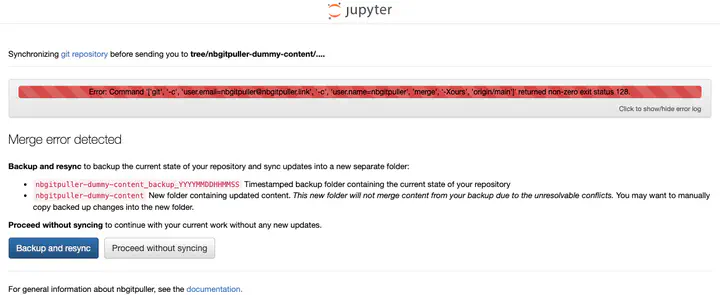
Error UX (new) #

New improvements to the UX include:
- terminal closed by default, but you can optionally toggle this open
- there is a copy to clipboard button to easily share the error log from the terminal
- more user-friendly and context aware helper message is displayed
- a link to the general documentation for reference
- a ‘Proceed without syncing’ button take the user to the compute platform without making any changes
- in the case of merge errors an extra Backup and resync button option is presented
Learn more #
Acknowledgements #
- UC Berkeley and the CloudBank Classroom project
- CAL ICOR for co-funding
- Eric Van Dusen and Sean Morris for championing this work
- Balaji Alwar for providing the data and sharing feedback
- Nicolas M. Thiéry for feedback on the UX design
Thanks for reading! If you'd like to follow our work, join our mailing list or subscribe to our blog. You can read our community hub documentation or learn about membership.